
Zapier
Connect Infinite Audience to the apps in your Zaps. Enrich one contact in the flow, send a larger file for processing, and continue automatically when the result is ready.
Connect
Section titled “Connect”The Zapier app uses OAuth, so a customer approves the connection without sharing an API key. It requests the access needed for discovery and enrichment, not account administration.
Available building blocks
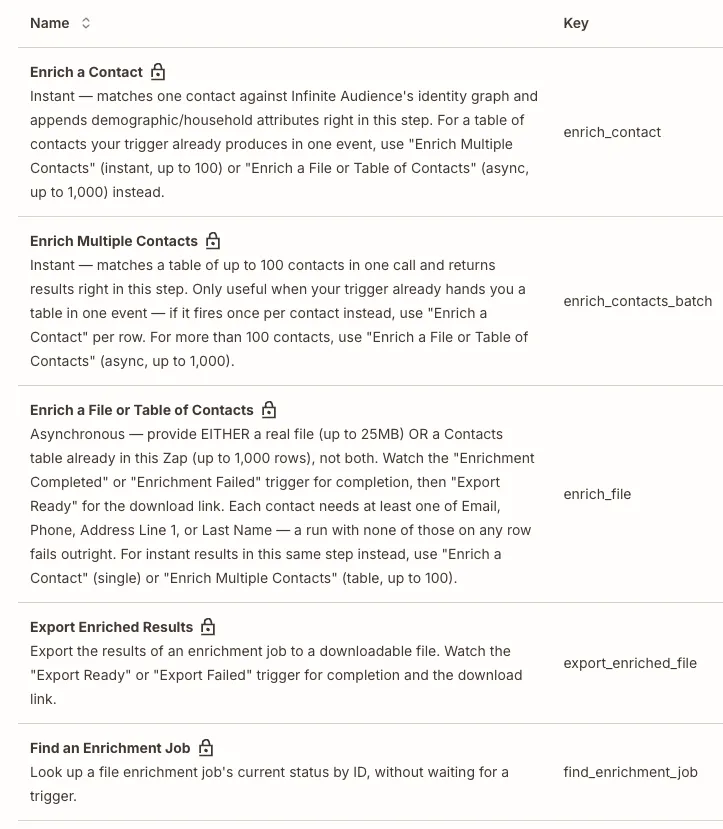
Section titled “Available building blocks”- Enrich a Contact returns selected attributes for one contact in the current Zap.
- Enrich Multiple Contacts handles a table of up to 100 contacts already present in one Zap step.
- Enrich a File or Table of Contacts starts a larger asynchronous job from a file or a table of up to 1,000 rows.
- Export Enriched Results prepares the finished file for download.
Use Find an Enrichment Job when another step already knows the job ID and needs the latest status.
Billing and record licences
Section titled “Billing and record licences”Zapier uses the billing arrangement of the Infinite Audience organization connected through OAuth. For a Shopify-billed organization, paid matching and delivery usage goes to its designated Shopify billing store and shares the organization’s usage bands and spend controls. Native-billed organizations keep native billing. Connecting Zapier does not create a second Infinite Audience subscription or let a Zap choose a different billing channel.
An active 12-month identity licence can be reused across integrations within the same organization. Reuse does not restart the licence term. New or expired identities can require a purchase; running an enrichment action is not a free-refresh setting. Records without a known identity may need matching before their licence coverage can be determined.
If the organization’s billing access is paused, paid Zapier work cannot bypass that pause. For a Shopify-billed organization, restore its designated billing store’s access before resuming paid work; connecting Zapier does not move those charges to native billing.
Continue when work is ready
Section titled “Continue when work is ready”Add one of four instant triggers to the next step of your Zap:
- Enrichment Completed
- Enrichment Failed
- Export Ready
- Export Failed
Zapier creates and manages the supporting webhook subscription. That means the workflow can continue as soon as the event arrives instead of checking on a timer.
For broader product workflows, connect through the API, an SDK, or MCP.