
Build with Segment Studio
Segment Studio turns a business question into a usable customer group. Pick the signals that matter, combine them with simple rules, and see the audience size before you save.
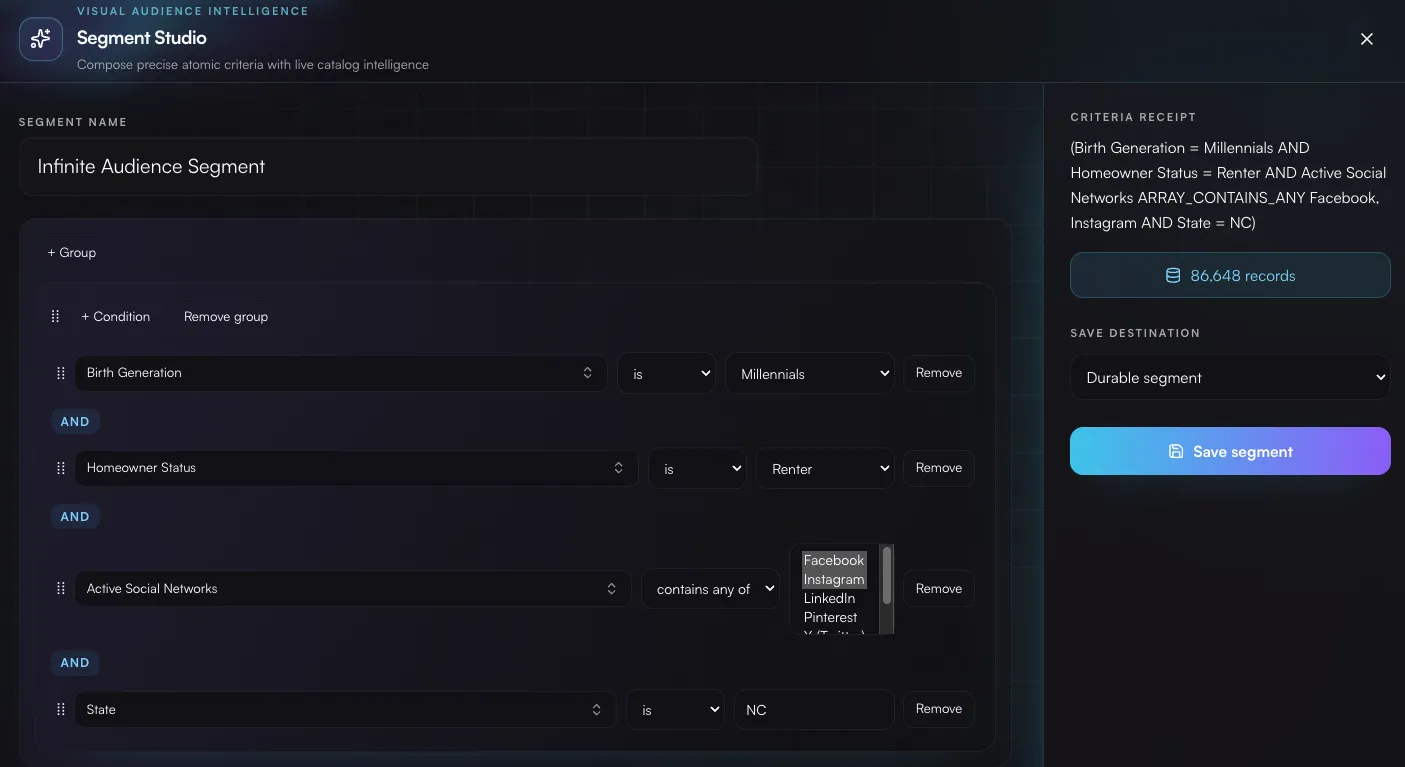
Build your segment
Section titled “Build your segment”- Open Segment Studio from Command Center or an audience workflow.
- Choose a field, an operator, and a value—for example, customers in California who recently moved.
- Add more criteria and choose whether all or any of them should match.
- Review the plain-language criteria receipt and live count.
- Save the result as a reusable segment, or add it directly to an audience.
Include what matters. Exclude what does not.
Section titled “Include what matters. Exclude what does not.”Segments can be added to an audience as inclusions or exclusions. That makes common jobs easy: start with qualified customers, remove recent purchasers, and keep the final group focused.
When the segment looks right, continue to build an audience.